Emacs and Org-roam: A Modern Developer's Guide
Emacs has been around since 1976 — yet it remains one of the most capable environments available to a developer today. This post covers what makes Emacs worth your attention, how it handles modern languages and projects, and how Org-roam compares to Obsidian as a tool for managing knowledge.
What is Emacs
Emacs is a programmable text editor built around Emacs Lisp. Unlike most editors, where the editor executes your code, in Emacs the editor is the runtime — every command, every keybinding, every visual element is a Lisp function you can inspect, override, or replace without restarting anything.
This is the essential difference. VS Code and JetBrains are applications you configure. Emacs is an environment you extend from within.
Features for Modern Developers
LSP — Language Server Protocol
Emacs speaks LSP through lsp-mode or eglot (built-in since Emacs 29). Any language that ships an LSP server — Rust Analyzer, gopls, clangd, Kotlin Language Server — works immediately:
- Go to definition across files and dependencies
- Find all references project-wide
- Inline diagnostics as you type
- Auto-import and code actions
- Rename symbol across the entire project
Completion
The completion stack used here is built around four packages that compose cleanly:
| Package | Role |
|---|---|
| Vertico | Vertical completion UI in the minibuffer |
| Orderless | Fuzzy, space-separated filtering across candidates |
| Marginalia | Annotations (file size, docstrings, keybindings) alongside each candidate |
| Consult | Enhanced commands: consult-ripgrep, consult-buffer, consult-line |
consult-ripgrep alone makes a meaningful difference — it searches across the entire project in real time with live preview as you move through results.
Which-key
which-key displays available keybindings in a popup after a short delay. If you press C-x and pause, every command reachable from that prefix appears on screen with a description. This makes discoverability natural — you stop needing to memorise keybindings and start building muscle memory organically.
Company and Yasnippet
company-mode provides in-buffer completion candidates from LSP, file paths, dictionary words, and snippet names. yasnippet handles snippet expansion — type a short trigger, press Tab, and a full code template expands with cursor positions for each field.
Language Support
Rust
rust-mode provides syntax highlighting, indentation, and hooks into Rust Analyzer via LSP. The configuration sets four-space indentation without tabs, matching rustfmt defaults:
(use-package rust-mode
  :ensure t
  :hook (rust-mode . (lambda ()
                       (setq indent-tabs-mode nil)
                       (setq tab-width 4))))
With Rust Analyzer connected, you get full type inference display, borrow checker errors inline, cargo check on save, and macro expansion previews.
Go
go-mode hooks into gopls for the full Go development experience — struct field completion, interface implementation checks, embedded documentation, and gofmt on save. The configuration uses tabs as Go convention requires:
(use-package go-mode
  :ensure t
  :hook (go-mode . (lambda ()
                     (setq tab-width 4)
                     (setq indent-tabs-mode t))))
C and C++
Emacs has handled C and C++ longer than most modern editors have existed. cc-mode is built in. Pair it with clangd via LSP and you get cross-reference navigation, include resolution, and diagnostics that understand your compile flags through compile_commands.json.
For large C++ codebases, clangd’s index is fast and accurate — definitions resolve correctly across templates and multiple translation units in a way that simpler tools struggle with.
Kotlin
kotlin-mode with LSP connects to the Kotlin Language Server, giving completion, diagnostics, and navigation for Android and server-side Kotlin projects:
(use-package kotlin-mode
  :ensure t
  :mode "\\.kt\\'"
  :hook (kotlin-mode . lsp))
Docker and Docker Compose
dockerfile-mode and docker-compose-mode add syntax support for container configuration. The docker package provides C-c d — a menu-driven interface for managing containers, images, volumes, and networks without leaving Emacs.
Project Management
Projectile
Projectile treats any directory containing a .git, pom.xml, Cargo.toml, or similar marker as a project. From any file inside a project:
C-c p f— find file by name with fuzzy searchC-c p s r— ripgrep across the entire projectC-c p b— switch between open project buffersC-c p p— switch projectsC-c p k— kill all project buffers
When combined with Consult, project switching opens a live preview of recent files in the new project as you type.
Treemacs
Treemacs is a file tree panel that displays on the left side. It is project-aware, Git-aware, and follows the active file automatically.
Key behaviours from the configuration:
- Follow mode — the tree expands and highlights the current file as you navigate
- Filewatch mode — the tree updates in real time when files are created, renamed, or deleted on disk
- Git integration — files show coloured indicators for modified, untracked, staged, and ignored status
- Deferred Git mode — Git status is computed asynchronously using Python for large repositories, so the tree never blocks
- Nerd Icons theme — file type icons from the nerd-icons font set
M-0         → focus Treemacs window
C-x t t     → toggle Treemacs
C-x t C-t   → reveal current file in tree
Single-click expands directories rather than requiring double-click, which makes navigation feel closer to a native file manager.
Magit
Magit is the most complete Git interface available in any editor. It operates through a staging buffer that shows the full diff of every changed file, with the ability to stage individual hunks or single lines — not just whole files.
Common workflow:
C-x g       → open Magit status buffer
s           → stage hunk under cursor
u           → unstage
c c         → commit (opens commit message buffer)
P p         → push to remote
l l         → log — visual branch graph
b b         → checkout branch
The log view renders a visual branch graph with author, date, and message. Rebasing, cherry-picking, bisecting, and stashing all have dedicated interfaces. The diff view understands word-level changes and renders them inline.
Org-roam
Org-roam brings Roam Research-style networked note-taking into Emacs, built on top of Org mode. Each note is a plain .org file. Notes link to each other with [[roam:Note Title]] syntax, and Org-roam maintains a SQLite index of every link so the backlink panel always reflects the current state of your knowledge graph.
Core Features
Capture templates — org-roam-node-find opens a node by title, creating it if it does not exist. A capture template drops you into a new file with frontmatter pre-filled: title, creation date, and any tags you add.
Backlinks panel — org-roam-buffer-toggle opens a side buffer listing every note that links to the one you are reading. This surfaces connections you did not consciously make when writing.
Daily notes — org-roam-dailies-capture-today creates a time-stamped daily journal note. Tasks, observations, and links written in a daily note become part of the graph automatically.
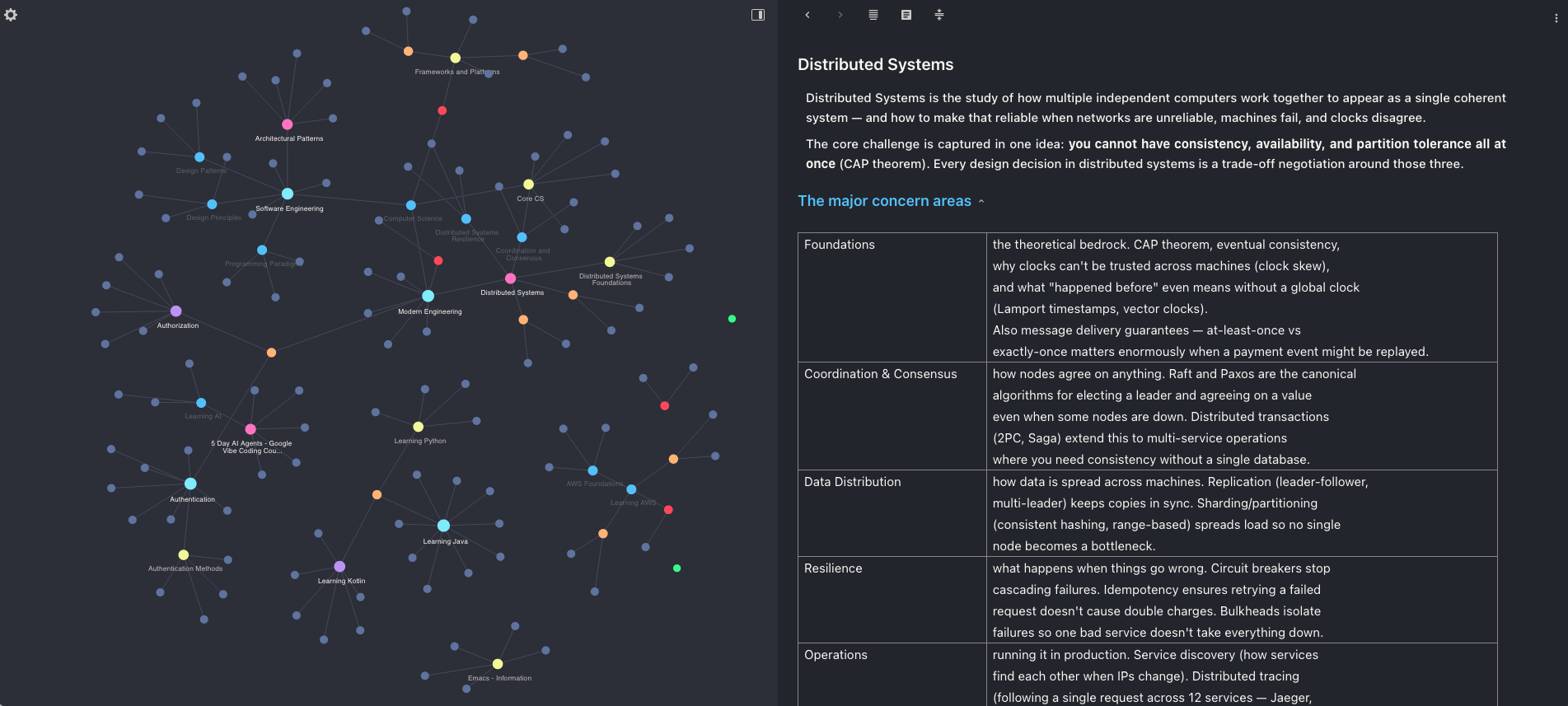
Graph visualisation — org-roam-ui renders the full knowledge graph as an interactive browser-based visualisation. Nodes are notes, edges are links. You can filter by tag, search by title, and navigate the graph by clicking nodes.
The image below is an Org-roam UI graph for notes on Distributed Systems — each node is a concept, each edge is a link written while taking notes:
Org Babel — code blocks in any .org file are executable. The configuration supports Python, Shell, Emacs Lisp, PlantUML, Ditaa, and Graphviz dot. Results render inline, including images. This makes Org files functional notebooks — a distributed systems note can contain a PlantUML sequence diagram that regenerates from source.
File server for Org-roam UI — a lightweight Python HTTP server serves the Org directory on port 8099 when Org-roam UI is active, so the browser-based graph can load note content for previews.
Org-roam vs Obsidian
Both tools are designed for networked note-taking with backlinks and graph views. The differences are fundamental rather than cosmetic.
| Org-roam | Obsidian | |
|---|---|---|
| File format | .org (Org mode markup) |
.md (Markdown) |
| Editor | Emacs only | Standalone app (Electron) |
| Graph view | org-roam-ui (browser-based, real-time) |
Built-in (Electron canvas) |
| Backlinks | SQLite index, always current | Built-in, always current |
| Code execution | Org Babel — Python, Shell, PlantUML, etc. | Not available natively |
| Customisation | Emacs Lisp — full control over every behaviour | Plugin API (JavaScript) |
| Plugins / extensions | MELPA ecosystem | Obsidian plugin marketplace |
| Sync | Git, Syncthing, any file sync | Obsidian Sync (paid) or third-party |
| Mobile | Limited (Orgzly on Android) | First-class iOS and Android apps |
| Learning curve | High — Emacs and Org mode both take time | Low — familiar Markdown, GUI-first |
| Pricing | Free and open source | Free core, paid Sync and Publish |
When Org-roam wins
- You are already in Emacs for development — notes live in the same environment as your code
- You want executable notebooks — diagrams and outputs generated directly from note content
- You need full programmatic control — query the SQLite database, generate reports, transform notes with Lisp
- You prefer plain text with no proprietary lock-in
When Obsidian wins
- You need mobile access that works well
- You want a low setup cost — install, open a folder, start writing
- Your team includes non-technical members who will not use Emacs
- You want a polished visual canvas and graph out of the box
The honest summary: Obsidian is faster to get into and better on mobile. Org-roam is more powerful once you are inside the Emacs ecosystem — the integration with code, Org Babel, and Magit makes it a single environment for writing, thinking, and building.
Emacs rewards investment. The first week is steep. The first month, you start customising. After that, the editor shapes itself around how you actually work — and rarely needs to change again.