K-Agenda: A Web Dashboard for Org Agenda
Like many others, I’ve researched task and project management tools. My main requirement was simple: capture my tasks, analyze them, and use that analysis to spend my time effectively on what actually matters. That search led me to Org mode, which I first paired with Org-roam for capturing notes and documents. Later, I started using Org Agenda to manage my day-to-day tasks.
I’ve been using the built-in org-mode within Emacs for quite some time now, so I figured it was high time I really made it my own.
Org-roam and Org-roam UI impressed me enough that I started wondering: what if there was a similarly nice web UI for analyzing my tasks? That question is how K-Agenda came to be.
What it is
K-Agenda is a web dashboard for org-agenda, in the spirit of Org-roam UI and org-hyperscheduler: a small Elisp backend serves a React web app and pushes live updates to the browser over a websocket whenever your Org files change. No polling, no manual export step — cycle a task’s state with C-c C-t in Emacs and the browser updates before you’ve even saved the file.
What it does
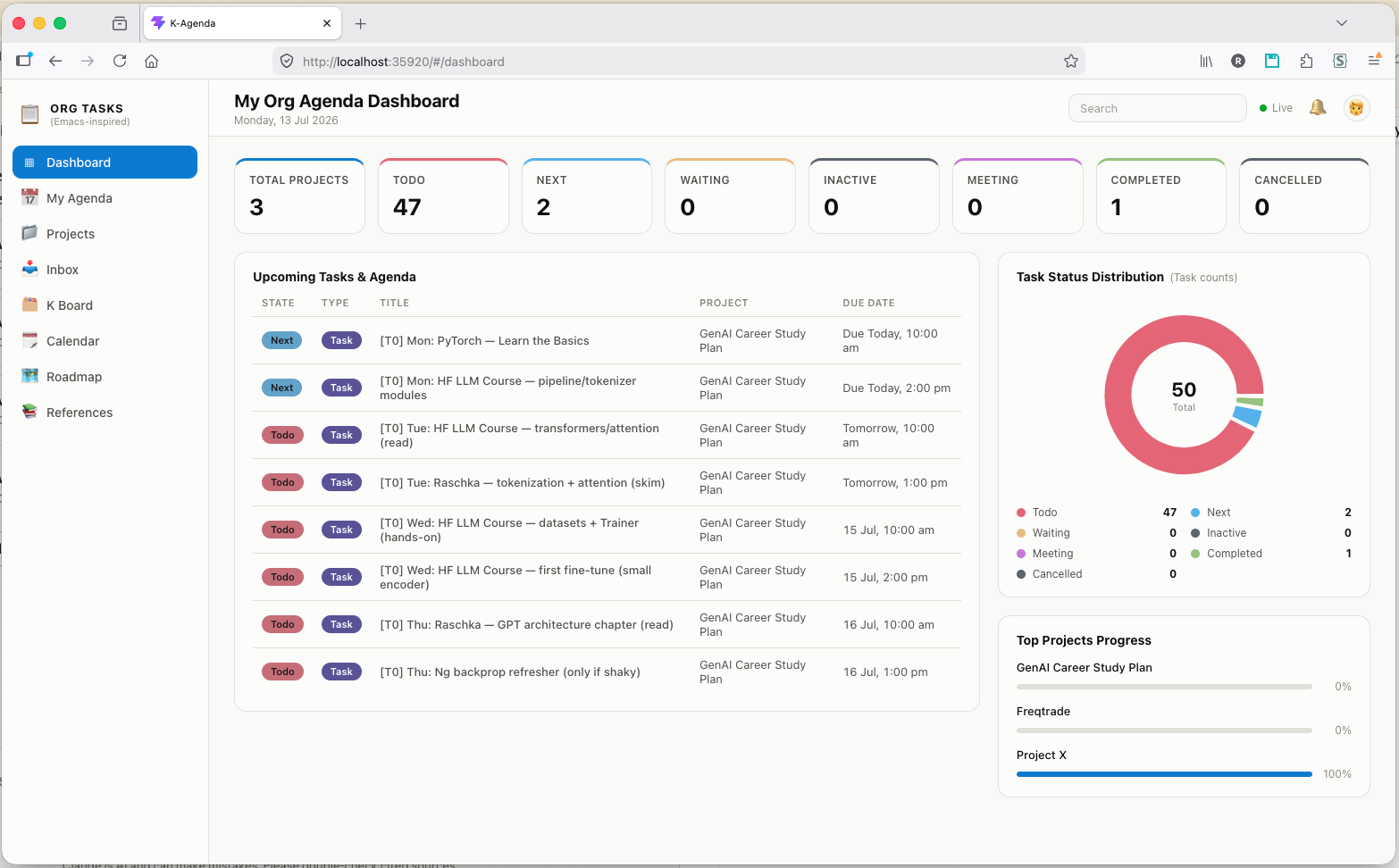
- Dashboard — stat tiles per TODO state, a status pie chart, an upcoming-tasks table, and a top-projects progress panel.
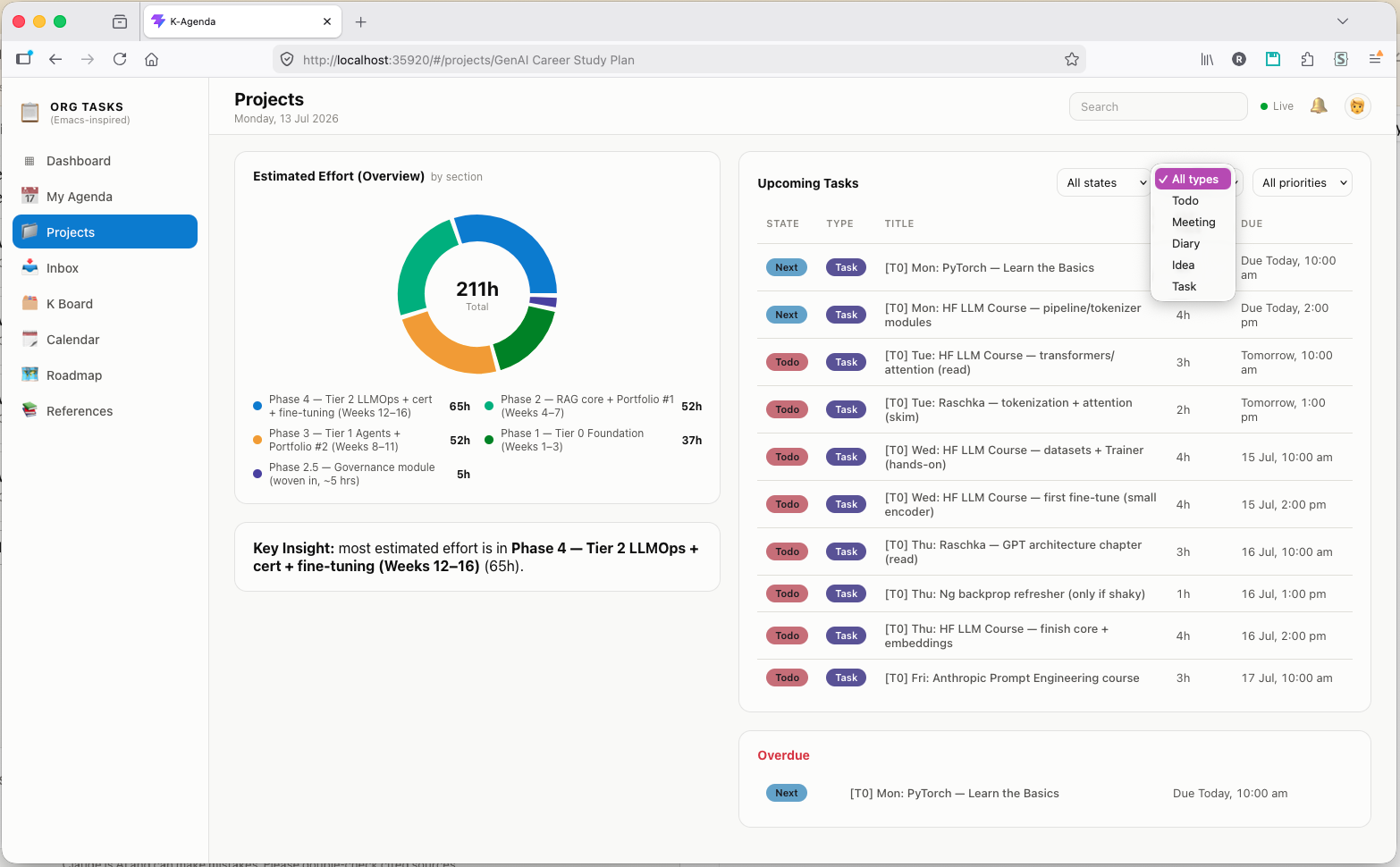
- Projects — one card per project, each linking to a Project Hub: a progress bar, the next milestone, an estimated-effort breakdown chart, and a filterable upcoming/overdue tasks table.
- Inbox — every task across your agenda files, searchable and filterable by state, type, and project.
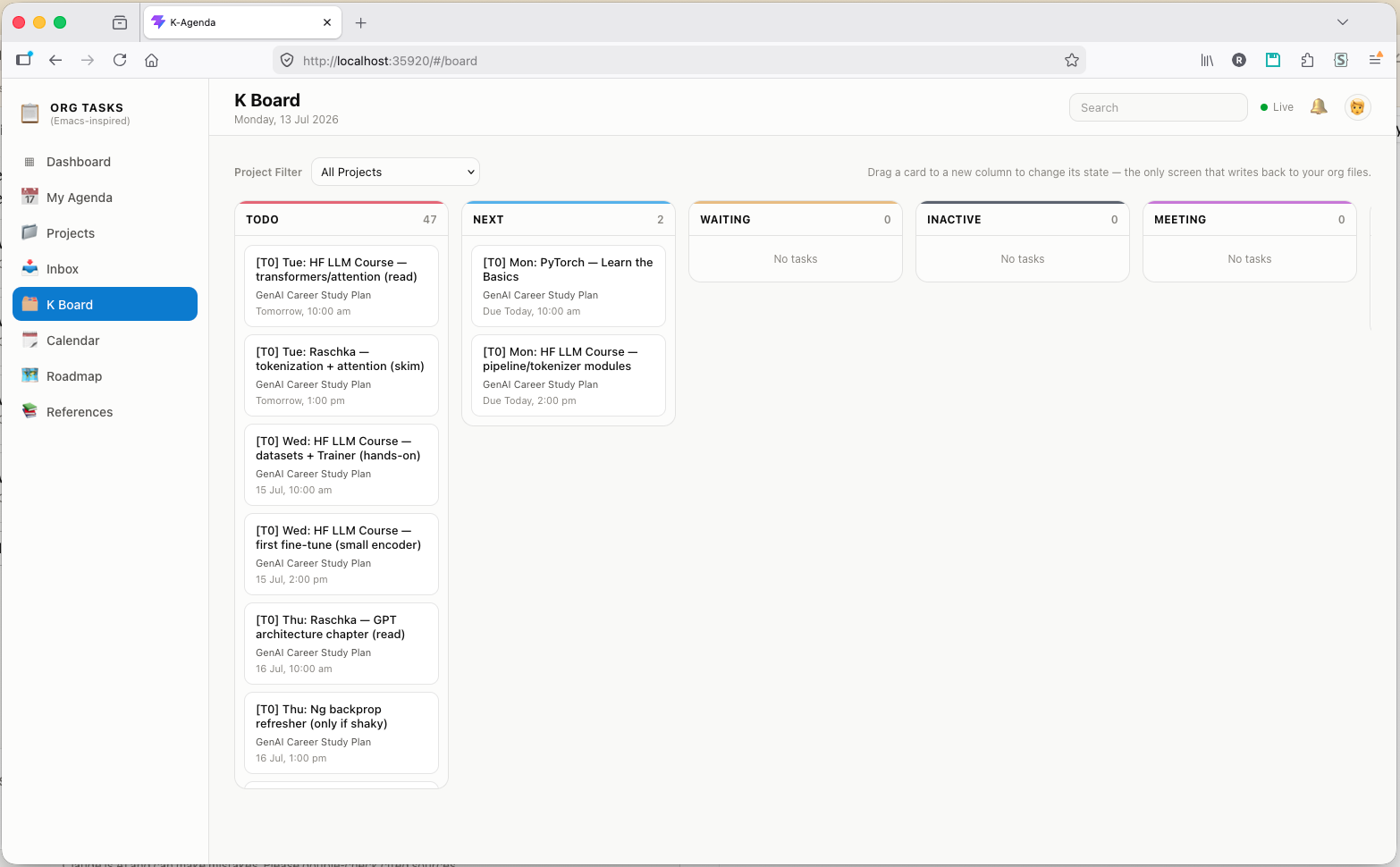
- K Board — a Kanban board per TODO state. The one screen that writes back to your Org files: drag a card to a new column to change its state, gated by an explicit transition graph and re-validated server-side.
- My Agenda — a 7-day strip navigator plus a table of the selected day’s tasks.
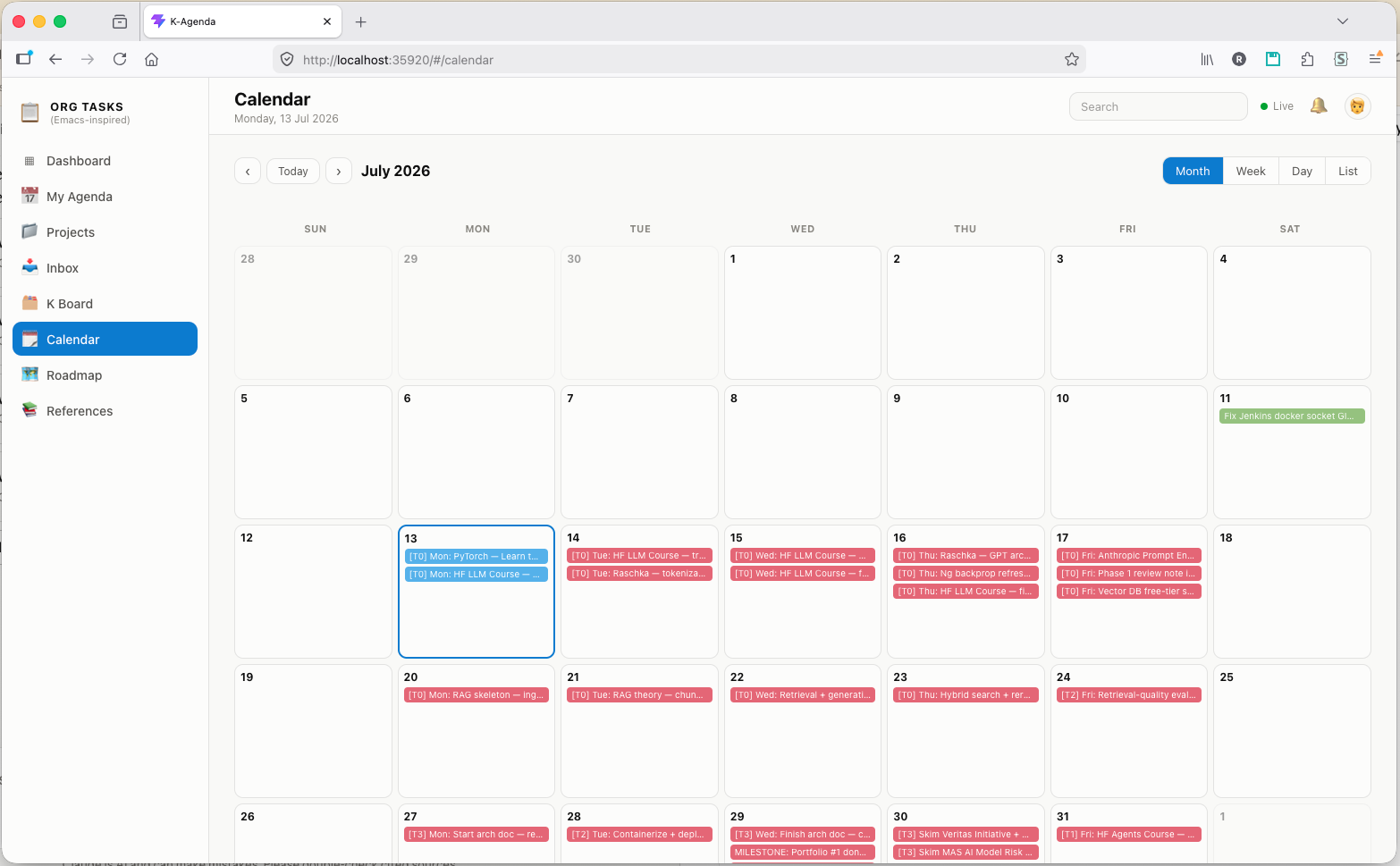
- Calendar — Month / Week / Day / List views of everything with a
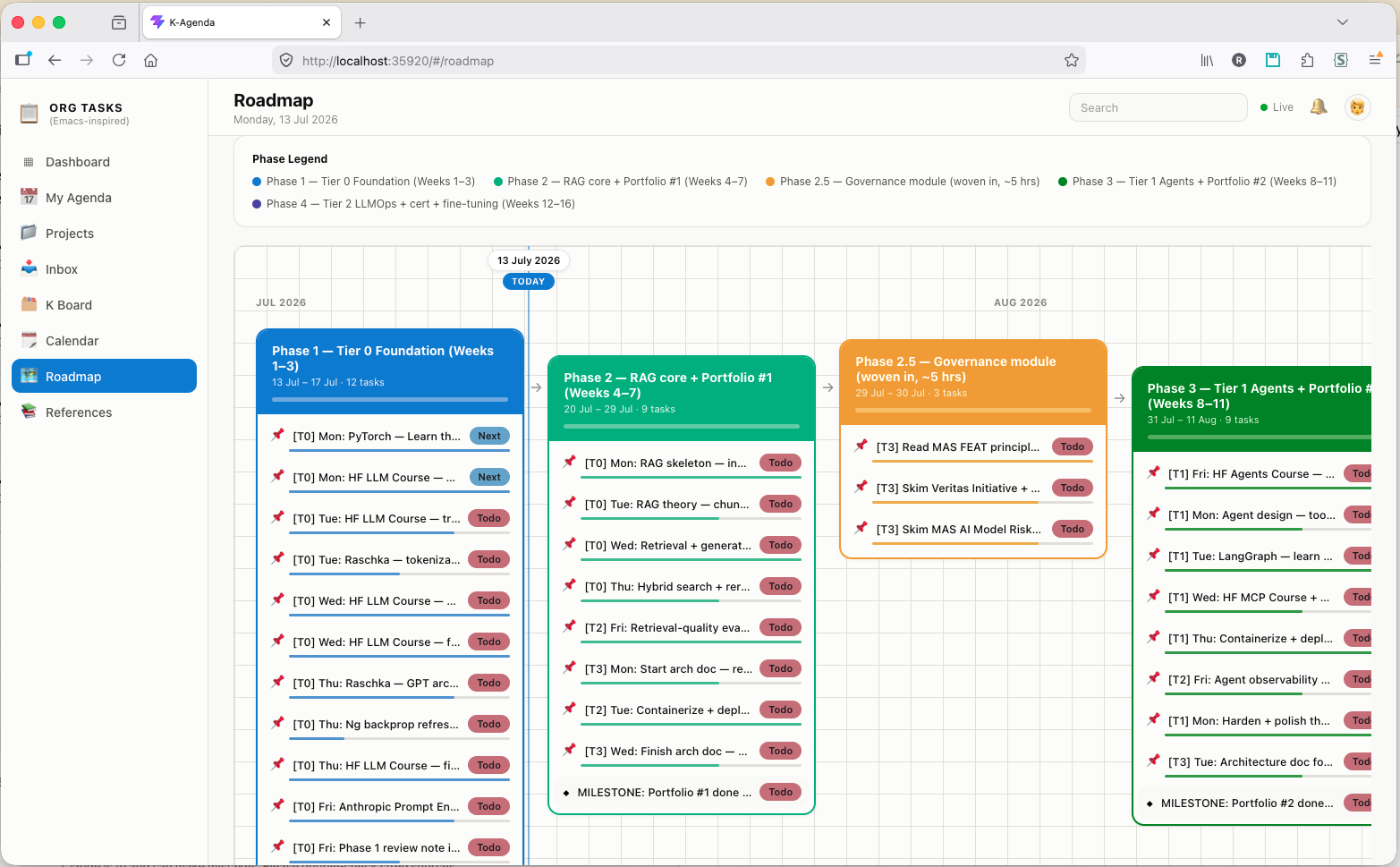
SCHEDULEDorDEADLINEtimestamp. - Roadmap — a per-project timeline: dated tasks grouped into phase cards along a month ruler, with a today-marker, a per-phase progress bar, and milestone callouts.
- References — a separate, read-only library for supporting docs (study notes, reading plans, anything with no
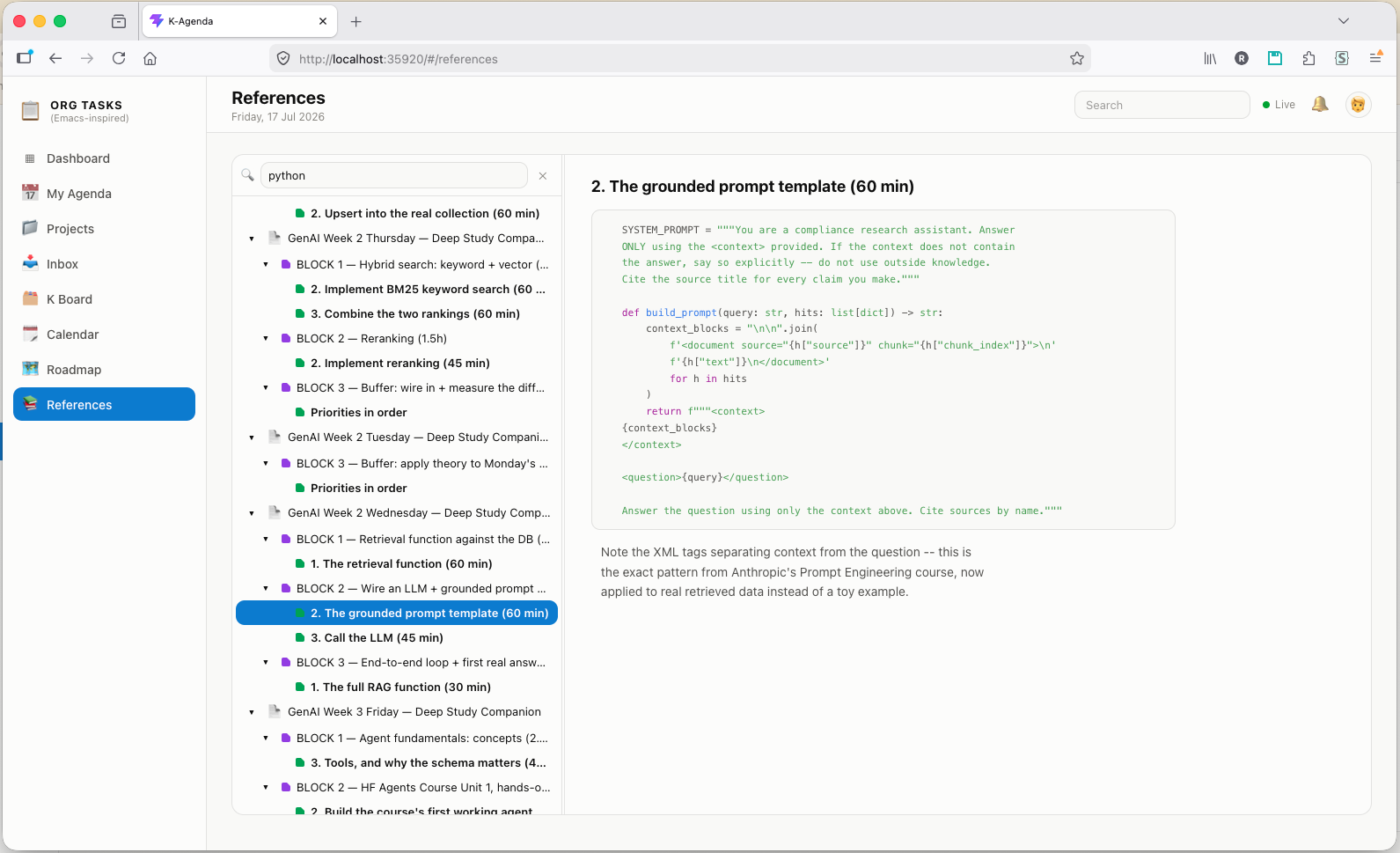
TODOkeywords) that would otherwise clutter your task list: a searchable outline tree on the left, the selected section’s body — lightly formatted — on the right. - Task detail — click any task anywhere to see its full body text, properties, and tags.
- Live sync — a task’s TODO state changes in the browser within a fraction of a second of you pressing
C-c C-tin Emacs.
Everything is read-only except K Board’s drag-and-drop — the dashboard reflects your Org files, it doesn’t replace editing them in Emacs.
Dashboard
Stat tiles for every TODO state, a status distribution chart, and the tasks coming up next:
Project Hub
Every project gets its own page: percent complete, the next milestone, an estimated-effort breakdown by section, and a filterable task table:
K Board
A Kanban board with drag-and-drop state changes — the only screen that writes back to your Org files, and only along an explicit transition graph:
Calendar
Month, week, day, and list views built from every scheduled and deadlined task:
Roadmap
Dated tasks grouped into phase cards along a month ruler, with a today-marker, per-phase progress, and milestones — the long view of a project that a task list can’t show:
References
The supporting material that has no TODO keywords and would only clutter a task list — study notes, reading plans, anything mostly prose. The tree narrows as you type, matching file names and document text in one pass: files matching on name rank first, then files matching only on content, and matching sections surface expanded in place, so a hit buried deep in a document lands you on the section rather than the top of the file.
Requirements
- Emacs 27.1+
- The
websocketpackage (M-x package-install RET websocket RET) - Node.js and npm, to build the frontend (only needed once, and again after pulling updates — nothing is required at runtime)
K-Agenda doesn’t depend on simple-httpd or any other web server package — its HTTP server is self-contained, specifically so it doesn’t conflict with other Emacs tools, like Org-roam UI, that also serve a local web UI.
Installation
git clone https://github.com/rukmaldias/K-Agenda.git ~/.emacs.d/site-lisp/k-agenda
cd ~/.emacs.d/site-lisp/k-agenda/web
npm install
npm run build
Then, in your Emacs config:
(add-to-list 'load-path "~/.emacs.d/site-lisp/k-agenda")
(require 'k-agenda)

(global-set-key (kbd "C-c K") #'k-agenda-open)
M-x k-agenda-open (or C-c K) starts the backend and opens the dashboard in your browser. It reuses whatever org-agenda-files is already set to — no separate file list to maintain.
Getting the most out of it
A few Org conventions K-Agenda understands, entirely optional but worth setting up:
Projects — point one entry of org-agenda-files at a directory, and every .org file inside it becomes its own project, no config edit needed to add one. Each project file needs one level-1 heading; a #+TITLE: at the top is used as the display name if present.
Task type badges — the Type badge (Todo / Meeting / Diary / Idea / Task) comes from a :CAPTURE_TYPE: property, most easily set through org-capture-templates. A heading with no :CAPTURE_TYPE: property just shows a blank badge — never guessed from anything else.
Estimated effort — if a task has an :Effort: property (e.g. 4:00), the Project Hub’s effort chart picks it up automatically, grouped by each task’s parent section heading.
Read-only, except K Board
Every screen is read-only — dragging is the one exception, and it’s deliberately constrained. A drag is only allowed if it matches a real transition in a state graph:
  INACTIVE ──► TODO ──► NEXT ──► WAITING
                 ▲        ▲          │
                 │        └──────────┤
                 └───────────────────┘

  Completed ◄── TODO, NEXT, MEETING
  Cancelled ◄── INACTIVE, TODO, NEXT, WAITING, MEETING

  MEETING is an event, not a process: it never enters the flow above, and
  only ever resolves to Completed or Cancelled.
Anything outside that graph is blocked with an explanation before any request is even sent, and every allowed move still asks for confirmation first. The server re-validates every request independently of the browser — a mutating action never trusts client-side checks alone — and refuses the write if the task’s actual current state doesn’t match what the browser believed it was dragging from, so a stale page can’t silently mutate the wrong heading.
Coexisting with Org-roam UI
simple-httpd — used by Org-roam UI and several other Emacs web-UI packages — keeps its server in a single global variable, and starting it unconditionally kills whatever server was already running under it. K-Agenda deliberately does not use simple-httpd; its HTTP server is a small, self-contained implementation with its own process, so it won’t fight Org-roam UI, or anything else built on simple-httpd, for the same shared slot. Both can run at once.
The backend and frontend talk over a single websocket. On connect, the browser gets a full snapshot; after that, org-after-todo-state-change-hook and after-save-hook, scoped to org-agenda-files, trigger a fresh, debounced broadcast to every connected tab. Full source is on GitHub, licensed under GPLv3.