Virtualization: From a 1960s Mainframe to the Confidential Cloud
Almost everything I work with day to day — Kubernetes, Docker, OKE, and before that TrustZone and TEEs — is a descendant of a single idea that’s now about sixty years old. The idea is abstraction: separating the logical view of a resource from its physical implementation, so software can be handed the illusion of owning a machine it doesn’t.
That one move — and the sixty years of engineering it took to make it fast, cheap, and safe — is the story of virtualization. I’ve been keeping study notes on it, and this post is my attempt to lay the whole lineage out in one place: where it came from, how a hypervisor actually pulls off the illusion, the four-way split between containers and VMs and microVMs and unikernels, and the frontier where the trust model itself gets inverted.
The trajectory, if you want the thesis up front, is this: isolation keeps getting stronger, the units keep getting lighter, and the boundary keeps moving closer to the hardware and to the workload at the same time.
Where the idea came about
Virtualization emerged in the 1960s from a very practical problem: mainframes were extraordinarily expensive, and organizations wanted to run multiple workloads and users on one machine without them stepping on each other. The insight was to insert a layer that gives each workload the illusion of having the whole machine to itself.
  +--------------+   +--------------+   +--------------+
  |  Workload A  |   |  Workload B  |   |  Workload C  |
  | own-machine  |   | own-machine  |   | own-machine  |
  |   illusion   |   |   illusion   |   |   illusion   |
  +------+-------+   +------+-------+   +------+-------+
         |                 |                  |
         v                 v                  v
  +----------------------------------------------------+
  |                 Abstraction layer                  |
  |   separates logical view from physical hardware    |
  +------------------------+---------------------------+
                           |
                           v
             +------------------------------+
             |      Physical mainframe       |
             |  single expensive machine,    |
             |    one set of resources       |
             +------------------------------+
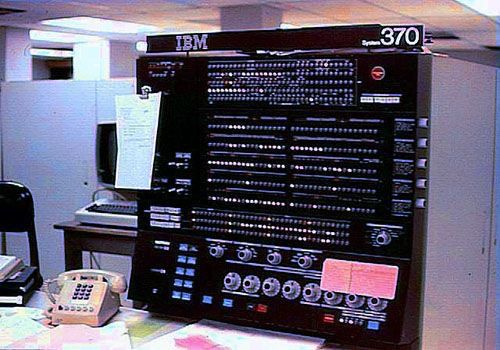
The first true virtual-machine systems were IBM’s CP-40 and CP-67, built at the Cambridge Scientific Center in the mid-to-late 1960s. CP-67 gave each user a complete virtual copy of the underlying hardware. The concept was commercialized with the System/370 and VM/370 in 1972, where hardware support for virtualization was baked in and time-sharing went mainstream in the enterprise.
Then in 1974 Popek and Goldberg published “Formal Requirements for Virtualizable Third Generation Architectures,” which is still foundational. It defined the three properties a virtual machine monitor has to guarantee:
- Equivalence — a program runs on the VM essentially as it would on bare metal.
- Resource control — the guest cannot touch resources not allocated to it.
- Efficiency — most instructions execute directly on the CPU, without the monitor getting involved.
That third requirement is the whole game. Anyone can emulate a machine instruction by instruction; the art is letting the guest run natively and only intercepting the handful of operations that matter. Every advance since has been about shrinking that interception cost.
The x86 problem, and three ways out
Through the 1980s and 90s the idea went dormant. Cheap x86 PCs and client-server computing spread, and — critically — x86 wasn’t designed to be virtualized. It had a set of “non-virtualizable” privileged instructions that broke the Popek-Goldberg rules outright.
Here’s the specific defect. x86 has four privilege rings; the OS expects ring 0 (full control), applications run in ring 3. If you run a guest OS in ring 0 it controls the real hardware, which defeats isolation. But if you de-privilege it to ring 1 or 3, certain sensitive instructions fail silently instead of trapping — the CPU doesn’t raise an exception the monitor could catch. There was no clean seam to hook.
Three approaches solved it, and it’s worth knowing all three because the industry passed through them in order:
1. Binary translation — VMware’s original method (1999). The hypervisor scans guest kernel code before it executes and rewrites the unsafe instructions on the fly into safe sequences that trap into the monitor. User-mode code still runs directly at native speed; only privileged kernel code is translated, and the translations are cached. Clever, and it let unmodified operating systems run — but complex and not free.
  +----------------+  +----------------+  +----------------+
  |   Guest OS 1   |  |   Guest OS 2   |  |   Guest OS 3   |
  |  e.g. Windows  |  |  e.g. Linux    |  |  e.g. NetWare  |
  +-------+--------+  +-------+--------+  +-------+--------+
          |                   |                   |
          v                   v                   v
  +----------------------------------------------------------+
  |                 VMware (hypervisor)                       |
  |   binary translation traps & rewrites unsafe x86         |
  |   instructions -> safe virtualization on stock CPUs      |
  +----------------------------+-----------------------------+
                               |
                               v
                +------------------------------+
                |     x86 PC / server          |
                |   commodity Intel/AMD CPU    |
                |   not designed to virtualize |
                +------------------------------+
2. Paravirtualization — Xen’s approach (2003). Don’t fight the guest, modify it. The guest OS is made aware it’s virtualized and issues explicit hypercalls (like syscalls, but into the hypervisor) instead of executing privileged instructions directly. Very efficient — but you need a modified guest kernel, so you can’t run something unmodified.
3. Hardware-assisted virtualization — the modern standard. Intel VT-x and AMD AMD-V (2005–2006) added a whole new CPU mode that sits orthogonal to the rings:
- Root mode (hypervisor) and non-root mode (guest). The guest OS can run in ring 0 of non-root mode, genuinely believing it has full control.
- A hardware structure — the VMCS on Intel, VMCB on AMD — stores each VM’s state.
- VM Exit / VM Entry: when the guest does something that needs the hypervisor’s attention (a privileged instruction, I/O, an interrupt), the CPU automatically traps to the hypervisor, which handles it and resumes the guest. No binary translation needed at all.
The mental model I keep coming back to: a hypervisor is an operating system whose “processes” are entire operating systems. And the last two decades of progress have been about pushing the expensive interception work down into silicon so the software path gets thinner and thinner.
How a hypervisor actually works
A hypervisor (or Virtual Machine Monitor) mediates access to physical hardware. Two broad shapes:
- Type 1 (bare-metal) runs directly on hardware and is effectively a minimal OS. Xen, VMware ESXi, Hyper-V, KVM. This is what powers data centers and cloud.
- Type 2 (hosted) runs as an application on a conventional OS, borrowing its drivers and scheduler. VMware Workstation, VirtualBox, QEMU in userspace. Convenient for the desktop, less performant.
The line blurs in practice — KVM lives inside the Linux kernel (Type 1 behaviour) but leans on Linux for scheduling and memory management (Type 2 behaviour).
Getting the CPU seam right was only half the battle. Two more parts are genuinely hard.
Memory virtualization. There are now three address layers: guest-virtual → guest-physical (the guest OS manages this) and guest-physical → host-physical (the hypervisor manages this). The old software trick, shadow page tables, had the hypervisor maintain hidden tables mapping guest-virtual straight to host-physical, kept in sync with the guest’s own — correct but brutal, since every guest page-table update trapped into the hypervisor. The hardware fix, Second Level Address Translation (Intel EPT, AMD NPT), adds a hardware-walked second translation layer so the MMU walks both levels automatically. That single change gutted virtualization overhead and is standard today. The IOMMU (Intel VT-d, AMD-Vi) extends the same idea to devices, enabling safe passthrough — handing a VM a real GPU or NIC while blocking DMA attacks on host memory.
I/O virtualization, which went through three generations:
- Full emulation — QEMU pretends to be a real device (say an e1000 NIC). Works with any unmodified guest, but slow: every I/O access traps.
- Paravirtualized I/O (virtio) — guest and hypervisor share ring buffers in memory and batch I/O to minimize exits. The dominant approach in KVM and the cloud today.
- Hardware passthrough / SR-IOV — a physical device exposes multiple virtual functions that map directly into VMs via the IOMMU, hitting near-native performance. Essential for high-throughput networking and GPUs.
The pattern repeats at every layer — emulate, then paravirtualize, then push it into hardware (VT-x → EPT → SR-IOV → APICv for interrupts). The KVM/QEMU split is the canonical modern embodiment: KVM is a kernel module exposing /dev/kvm that handles the fast privileged path — the VM exit/entry loop, vCPU scheduling as ordinary Linux threads — while QEMU sits in userspace doing device emulation and the machine model, calling into KVM via ioctls. Fast path in the kernel, flexible path in userspace. That clean division is why libvirt, OpenStack, and most clouds standardized on it.
Consolidation, then the cloud
Once virtualization was efficient, the economics took over. Data centers replaced racks of underused physical servers with a few hosts each running many VMs — server consolidation, the engine of enterprise IT in the 2000s.
Then in 2006, AWS EC2 let anyone rent a virtual machine by the hour, and infrastructure became elastic and pay-per-use.
   Tenant A        Tenant B        Tenant C     ...on demand
  +---------+     +---------+     +---------+
  |   VM    |     |  VM VM  |     |   VM    |    rent VMs,
  | (1 inst)|     | (scale) |     | (1 inst)|    pay-per-use,
  +----+----+     +----+----+     +----+----+    elastic
       |               |              |
       v               v              v
  +----------------------------------------------------------+
  |             AWS EC2 control plane (2006)                  |
  |   provision, meter & bill virtual machines on demand     |
  +----------------------------+-----------------------------+
                               |
                               v
  +----------------------------------------------------------+
  |              Hypervisor fleet (Xen -> Nitro)             |
  |   slices each host into many isolated guest VMs          |
  +----------------------------+-----------------------------+
                               |
                               v
  +----------------------------------------------------------+
  |        Physical server fleet across data centers         |
  |   pooled CPU, memory, storage, network                   |
  +----------------------------------------------------------+
The shift here is more economic than technical. Virtualization decoupled workloads from specific physical machines, so a provider could pool thousands of servers and rent slices by the hour. EC2 turned capital expenditure (buying servers) into operating expenditure (renting capacity), and the elasticity — spin up when you need it, tear down when you don’t — is what made “the cloud” a business model rather than just a hosting technique.
The great divide: shared kernel vs dedicated kernel
Everything after this point is a variation on one question: what is the unit of isolation, and where is the boundary enforced? Performance, security, size, compatibility — all of it flows from that single choice. Four answers now coexist, and this diagram is the one I’d keep if I could keep only one:
                    SHARED KERNEL          |          DEDICATED KERNEL
                    (OS-level isolation)   |          (hardware isolation)
  ──────────────────────────────────────────────────────────────────────
                                           |
   CONTAINER          VM          MICROVM          UNIKERNEL
  ┌──────────┐   ┌──────────┐  ┌──────────┐    ┌──────────┐
  │   App    │   │   App    │  │   App    │    │  App +   │
  │  + libs  │   │  + libs  │  │  + libs  │    │  libOS   │
  ├──────────┤   ├──────────┤  ├──────────┤    │ (fused)  │
  │(namespace│   │  Full    │  │ Minimal  │    │ single   │
  │ +cgroup) │   │  Guest   │  │  Guest   │    │ address  │
  │          │   │  Linux   │  │  Linux   │    │ space    │
  ├──────────┤   ├──────────┤  ├──────────┤    ├──────────┤
  │  SHARED  │   │  Full    │  │ Minimal  │    │  (any)   │
  │  HOST    │   │  VMM     │  │  VMM     │    │   VMM    │
  │  KERNEL  │   │ (QEMU)   │  │ (Firecr.)│    │          │
  ├──────────┤   ├──────────┤  ├──────────┤    ├──────────┤
  │       H Y P E R V I S O R   /   H A R D W A R E       │
  └───────────────────────────────────────────────────────┘

  Isolation:  process    │◄──────── hypervisor boundary ────────►│
              (kernel)   │          (VT-x / EPT / hardware)      │
The vertical line is the great divide: containers share the host kernel; the other three each get a dedicated kernel (or, for unikernels, a kernel-replacement) enforced by the hypervisor.
Containers — virtualizing the OS
Docker popularized OS-level virtualization in 2013. There’s no hypervisor and no guest kernel — the Linux host kernel is tricked into giving each container the illusion of its own machine with three existing kernel features:
- Namespaces isolate what a process can see — its own PID tree, network interfaces, mount table, hostname. A process in a PID namespace sees itself as PID 1 and can’t see host processes.
- cgroups isolate what a process can use — CPU, memory, I/O limits.
- Capabilities / seccomp / LSMs restrict what a process can do — which syscalls, which privileged operations.
So a container is just a normal Linux process with restrictions applied. There is no “container” object in the kernel; it’s an illusion assembled from namespaces plus cgroups. That’s why containers start in milliseconds and pack far more densely than VMs.
The defining consequence is the shared kernel. Every container on a host talks to the same kernel, and that kernel is a shared attack surface — one namespace-escape bug can let a container break out to the host or into a sibling — a shared failure domain, and a compatibility constraint (no Windows containers on a Linux kernel). Weak isolation, maximum convenience and density.
Kubernetes (2014) then solved the problem that follows from running thousands of these: it decides which node each container lands on, scales replicas up and down, and restarts what dies. Orchestration is what made containers viable in large production systems.
The contrast with a full VM is the whole point: a VM virtualizes the hardware and carries its own guest kernel, so each one boots a complete OS behind a hardware boundary. Strong isolation, heavy footprint, boots in seconds — which is exactly why multi-tenant public cloud was historically built on VMs. You don’t put mutually-distrusting tenants on a shared kernel.
MicroVMs — thinning the monitor
VMs are heavy largely because the monitor (QEMU) emulates a whole PC — BIOS, PCI bus, legacy controllers — most of which a cloud workload never touches. A microVM strips the monitor down to almost nothing.
AWS’s Firecracker (written in Rust) keeps only a minimal machine model — no BIOS, no PCI, no legacy emulation — just virtio-net, virtio-block, a timer, and a serial console, with direct kernel boot. What stays the same is that you still boot a real, minimal Linux kernel, and isolation is still the hardware boundary. So you keep VM-grade security while shedding the monitor bloat.
  +-----------+ +-----------+ +-----------+ +-----------+
  | microVM A | | microVM B | | microVM C | | microVM D |
  | 1 function| | 1 function| | 1 function| | 1 function|
  | own kernel| | own kernel| | own kernel| | own kernel|
  | ~125ms    | | ~125ms    | | ~125ms    | | ~125ms    |
  |  boot     | |  boot     | |  boot     | |  boot     |
  +-----+-----+ +-----+-----+ +-----+-----+ +-----+-----+
        |             |             |             |
        +------+------+------+------+------+------+
                             |
                             v
  +----------------------------------------------------------+
  |             Firecracker VMM (KVM-based)                   |
  |   minimal device model, tiny attack surface;             |
  |   VM-strong isolation + container-like speed & density    |
  +----------------------------+-----------------------------+
                               |
                               v
  +----------------------------------------------------------+
  |            Host kernel + KVM (hardware virt)              |
  +----------------------------+-----------------------------+
The numbers are the story: ~125ms boot, under 5MB memory overhead, thousands of microVMs per host — VM-strength isolation at near-container density. And because the monitor itself is tiny (Firecracker is ~50k lines of Rust against QEMU’s millions of lines of C), the host-side attack surface shrinks too. It won production because it runs unmodified Linux apps: AWS dropped it under Lambda and Fargate with zero rewrites, getting container-like agility with VM-like tenant isolation. That combination is exactly what serverless needed.
Unikernels — thinning the guest
Unikernels push in the opposite direction to microVMs. Even a minimal Linux guest is overkill for running one application on virtual hardware that’s already isolated by the hypervisor — full syscall table, multi-process support, thousands of drivers, a shell, a permission system for a machine with one “user.” So delete the OS as a separate thing entirely.
A unikernel compiles your application together with only the OS library functions it actually calls — a TCP stack, an allocator, a scheduler — into a single-address-space, single-process bootable image, often only hundreds of kilobytes. The app is the OS. This is the practical realization of the library OS idea from MIT’s Exokernel work in the mid-1990s, married to the hypervisor: the libOS only has to talk to clean virtual hardware, which is far simpler than supporting real, messy physical hardware.
The consequences all fall out of that one decision:
- No user/kernel split → a “syscall” becomes a direct function call: no trap, no context switch, no argument copying across a protection boundary. Genuinely faster. But there’s no memory protection inside the image — safety has to come from the language or the hypervisor boundary.
- No shell, no fork/exec, no unused syscalls → the attack surface is tiny, and whole classes of exploit (spawn a shell, pivot to another binary) become structurally impossible. An attacker who gets code execution finds no
/bin/shand no way to spawn anything. - Single process → a trivial scheduler and no IPC machinery.
- Isolation is still the hypervisor boundary, same as VMs and microVMs.
There are two families. Language-specific unikernels rewrite OS components as native libraries in one memory-safe language — MirageOS (OCaml) is the exemplar, with a TCP/IP and TLS stack written in pure OCaml (partly as a response to Heartbleed), booting in milliseconds into images well under a few MB. POSIX-compatible ones aim to run existing apps by implementing a slice of the Linux ABI — OSv runs unmodified JVM apps, Rumprun reuses real NetBSD drivers, and Unikraft (a Linux Foundation project, and where the community energy now sits) is a modular construction kit targeting KVM, Xen, and Firecracker, with single-digit-millisecond boots and images in the tens-to-hundreds of KB.
Why haven’t they taken over? Honestly, operational friction more than any technical flaw: no shell, no ssh, no ps makes debugging a black-box image hard; clean-slate unikernels need porting and POSIX ones still hit ABI gaps; unsafe languages reintroduce the memory-safety risk; and the whole ops ecosystem — monitoring, Kubernetes — is container-centric. Maximum minimalism, minimum compatibility, which is why they stayed niche for fifteen years.
One orthogonality worth nailing
MicroVMs and unikernels get confused constantly, but they operate on different layers:
- A microVM thins the monitor and keeps a real (minimal) guest OS.
- A unikernel thins the guest and keeps whatever monitor.
They’re complementary, not competing — Unikraft runs on Firecracker, giving a thin monitor and a thin guest at once: the deepest minimalism available.
The four, side by side
| Dimension | Container | VM | MicroVM | Unikernel |
|---|---|---|---|---|
| Isolation boundary | Shared kernel (ns/cgroups) | Hypervisor / HW | Hypervisor / HW | Hypervisor / HW |
| Guest OS | None (shares host) | Full OS | Minimal Linux | None (libOS fused in) |
| What’s minimized | — | — | The monitor | The guest |
| Boot time | ~ms | seconds | ~100–125ms | single-digit ms |
| Memory overhead | negligible | 100s MB – GB | < 5 MB | KB – low MB |
| Isolation strength | Weak (shared kernel) | Strong | Strong | Strong |
| Attack surface | Large (host kernel) | Large (full guest + QEMU) | Medium (min guest + tiny VMM) | Smallest (linked libs) |
| Compatibility | Any Linux app | Any OS unmodified | Unmodified Linux apps | Needs porting |
| Density | Highest | Lowest | High | Highest |
| Tooling / maturity | Massive (K8s / OCI) | Mature | Growing (prod at AWS) | Niche / research |
| Typical use | Microservices, CI/CD | Multi-tenant, legacy | Serverless (Lambda) | Edge, high-security |
The heuristic I’d actually apply: trusted homogeneous workloads at max velocity → containers; untrusted, multi-tenant, or a non-Linux OS → VMs; untrusted code needing fast spin-up and strong isolation → microVMs; a fixed single-purpose service where attack surface is everything, especially at the edge → unikernels.
Confidential computing — inverting the trust model
There’s one more frontier, and it’s the one closest to my old TrustZone work. Everything above protects data at rest (encrypted on disk) and in transit (TLS). But there’s a third state that was historically unprotected: data in use — the moment it’s decrypted into RAM, registers, and caches to actually be computed on. At that instant it sits in plaintext, and anyone with enough privilege over the machine can read it.
Confidential computing closes that gap, and to do so it inverts a trust model that held for decades. Classically, trust is hierarchical and cumulative — the more privileged you are, the more you can see:
Ring 3 (apps) < Ring 0 (OS kernel) < Ring -1 (hypervisor) < Ring -2 (firmware)
Whoever controls the hypervisor controls everything above it. In the cloud that means the provider — and anyone who compromises the provider’s host software — can read every tenant’s memory. Confidential computing removes the host software and the provider from the trusted computing base. The CPU hardware itself becomes the root of trust and enforces that even ring -1 and ring 0 — the very software running your VM — cannot read your memory:
                +------------------------------+
                |     Confidential VM /         |
                |       enclave (guest)         |
                |   code + data live here in    |
                |        the clear              |
                +--------------+---------------+
                               |
                    memory encrypted at the
                    hardware boundary (per-VM key)
                               |
        +======================v======================+
        H  Hypervisor / host             CANNOT read  H
        H  - schedules the VM             guest memory H
        H  - but sees only ciphertext     (encrypted)  H
        +======================+======================+
                               |
                               v
  +----------------------------------------------------------+
  |            CPU hardware trust boundary                    |
  |   AMD SEV / SEV-SNP   |   Intel TDX                       |
  |   - per-VM memory encryption keys                         |
  |   - attestation proves the VM is genuine & untampered    |
  +----------------------------------------------------------+
This maps directly onto the TrustZone worldview — a “secure world” the “normal world” and its OS can’t inspect — but projected onto whole VMs on server-class silicon. Two hardware primitives do the work. Memory encryption: an engine on the memory controller encrypts data as it leaves the CPU package into DRAM, with per-VM keys generated in hardware and never exposed to software, so a malicious hypervisor, a cold-boot attack, or a bus snoop all see only ciphertext. Access control and integrity: because encryption alone lets a hostile hypervisor remap or replay pages, modern designs (AMD SEV-SNP’s Reverse Map Table, Intel TDX’s signed module) track which page belongs to which guest and detect tampering.
But encryption only protects the environment — attestation is what proves to a remote party that the environment is genuine and unmodified before any secret is released into it. The hardware measures (hashes) the initial code and configuration, the CPU signs that measurement with a key rooted in the vendor’s certificate chain, and a relying party verifies the signature chains back to real silicon and matches known-good code before releasing keys or data. The guarantee it buys you: “the exact code I expect is running, inside genuine confidential hardware, on a machine whose host software cannot see inside — so it’s safe to send my data.” Without attestation, memory encryption is nearly useless.
The field split into two styles and then chose one. Process-level enclaves (Intel SGX) carve a tiny encrypted region out of one application — smallest possible TCB, but you must re-architect your app around an ecall/ocall boundary, and early SGX was plagued by side-channel breaks. VM-level confidential VMs (AMD SEV-SNP, Intel TDX, ARM CCA’s Realms) encrypt an entire guest with little or no application change. The market picked convenience, so confidential VMs dominate — you take your existing VM and run it confidentially.
And here the lineage closes a loop. A confidential VM’s weakness is that its TCB now includes the entire guest OS — a whole Linux to measure, trust, and keep patched. A unikernel is the ideal confidential payload: a few hundred KB of purpose-built code instead of a general OS, minimal attack surface even inside the encrypted boundary, millisecond boot for on-demand confidential serverless. The two frontiers compose beautifully — confidential computing shrinks who can see your workload (removing the host); unikernels shrink what is inside the trusted boundary (removing the OS). Together they approach a near-minimal, fully-isolated unit of computation.
None of this is magic, and the notes I keep on it are honest about the weaknesses: side channels (timing, cache, speculative-execution leaks) keep extracting secrets without breaking the encryption, and each generation patches known channels while new ones appear; you’ve traded trusting the cloud provider for trusting the chip vendor; attestation flows are operationally intricate and easy to get subtly wrong; there’s measurable performance overhead from encryption and I/O bounce-buffering; and getting data safely in and out — especially confidential GPUs for AI — is an emerging, not solved, area.
The convergence, and where it’s heading
Step back and the whole field is now collapsing the historic trade-off between container agility and VM isolation, from both directions at once. From the container side, sandboxed runtimes like gVisor (a userspace kernel that shrinks the shared-kernel attack surface) and Kata Containers (each container inside a lightweight microVM, but looking like a container to Kubernetes) add stronger boundaries. From the VM side, microVMs and unikernels push toward container speed and density. Kata Containers is literally microVMs wearing a container interface; Unikraft-on-Firecracker is a unikernel on a microVM. The clean four-way taxonomy is real, but production increasingly blends it.
The other bets on the future, in rough order of how confident I am about them:
- Confidential computing becomes standard as privacy and regulation tighten — very relevant in BFSI, where I’ve spent time.
- VMs and containers keep converging — isolation-strong-yet-lightweight runtimes dominating serverless and edge.
- WebAssembly as a lightweight sandbox that may complement or partly displace containers for portable, near-native execution — and arguably a competing realization of the same desire that unikernels chase (tiny, secure, fast-starting, portable), with far more momentum today. Whether the future belongs to unikernels, Wasm, or a blend is one of the genuinely open questions in systems right now.
- Hardware/software co-design for AI — deeper GPU, DPU, and memory virtualization, GPU partitioning, disaggregated infrastructure.
- Unikernels resurging specifically as confidential-computing payloads and edge workloads.
- AI-driven orchestration — autonomous placement, scaling, and healing of virtualized workloads.
Sixty years on, the shape of the thing is clear. It started as a way to let a few expensive mainframes serve many users, and it became the substrate the entire cloud economy runs on. But the direction of travel hasn’t changed since CP-67: isolation keeps getting stronger, the units keep getting lighter, and the boundary keeps moving closer to the hardware and to the workload at the same time. The illusion Popek and Goldberg formalized in 1974 — that your software owns a machine it doesn’t — is now being drawn so tightly that the machine can’t even see inside your software.